MuteDeck v4.9.3
This release lets you choose what clicking the tray icon does, fixes Teams and Slack controls on multi-display setups, and stops a false "Accessibility permission broken" warning that could silently kill meeting detection on macOS. Teams pairing is gone — Microsoft removed the API behind it.
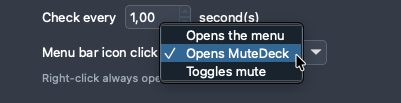
Choose What Clicking the Tray Icon Does
A click on the tray (Windows) or menu bar (macOS) icon can now open the menu, open the MuteDeck window, or toggle your mic. Pick yours under Settings → General; a right-click always opens the menu. Defaults are unchanged per platform. On macOS the window now opens under the menu bar icon, and a second click tucks it away again.
Teams Pairing Removed
Microsoft removed the third-party device API from Teams, so pairing had nothing to connect to. It's gone from Settings. Teams keeps working through interface control — just make sure the Teams language dropdown matches the language Teams is displayed in, or the buttons can't be found.
Some people might still have the third-party API in their Teams, but honestly, MuteDeck interface control is better than the API control ever was.
Meeting Detection Keeps Running (macOS)
MuteDeck could report that its Accessibility permission was broken when it wasn't — a busy Finder or a meeting app that was still starting up was enough — and since 4.9.1 that warning stopped all meeting detection. Only a real denial counts now, and a suspected problem no longer halts detection.
Controls on a Second Display (macOS)
Mute, video and leave silently did nothing when a Teams meeting or Slack huddle sat on a second display while another app had focus. MuteDeck now raises the meeting window itself and hovers the control bar before clicking, so the click lands where it should. Also fixes a wrong Teams process being targeted when Teams classic is installed, and non-English Macs running Teams in English.
Other Improvements
- Teams screen share (macOS): Starting a share no longer fails on the content picker, and the compact bar is used while sharing instead of raising the full window over your content.
- Dropdowns: Longer options are no longer clipped by the arrow — most noticeable in translated languages.
- Open Settings: Opens Settings only, instead of also dragging the main window onto your screen.
