# How to Write an Agenda for a Meeting: A Practical Guide That Actually Works
Learning how to write a meeting agenda really just comes down to three simple things: figuring out a clear purpose, listing timed discussion points as actionable questions, and telling attendees exactly what they need to do beforehand. Once you get that structure down, you're not just making a topic list—you're building a roadmap for a meeting that actually gets stuff done.
# Why a Great Agenda Is Your Secret Weapon Against Bad Meetings
Let’s be real. We’ve all been trapped in meetings that felt like a complete waste of time. They meander, key people show up unprepared, and everyone logs off wondering what, if anything, was accomplished. It's more than just frustrating; it's a massive drag on productivity and team morale.
A well-crafted agenda is the single best tool you have to combat that chaos. It turns a potential time-waster into a focused, outcome-driven session where real work happens. Think of it less as a list of topics and more as a strategic plan that respects everyone’s time.
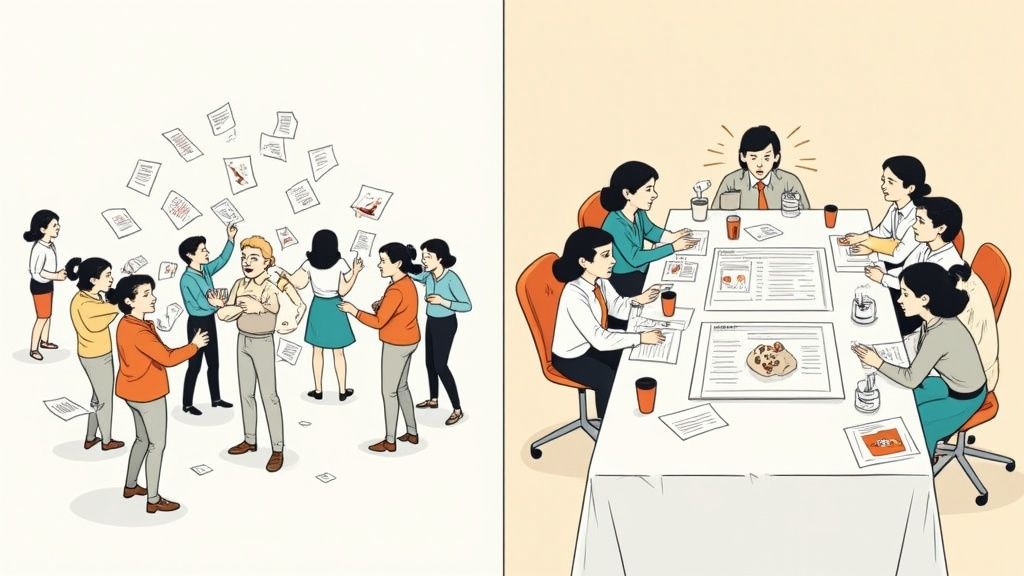
# From Chaos to Clarity: A Real-World Scenario
Imagine a meeting invite pops up with the title, "Q3 Marketing Campaign Update." Vague, right? Without an agenda, the call starts with a random update, gets derailed by a debate over a minor logo placement, and runs 15 minutes over, leaving everyone more confused than when they started.
Now, let's replay that with a proper agenda. The invite clearly states the objective: "Finalize budget and timeline for the Q3 campaign." It then lists specific, timed talking points:
- Review Final Budget Proposal (15 mins): Do we approve the final allocation for digital ads?
- Confirm Key Project Milestones (10 mins): Can we all agree on the launch date and creative deadlines?
- Assign Task Owners (5 mins): Who is responsible for each next step?
See the difference? In this version, the team arrives ready, stays on track, and leaves with concrete answers. That's the power of a thoughtful agenda.
Practical Tip: To ensure your team always uses an agenda, create a simple, reusable template in a shared space like Google Docs or Confluence. This removes friction and makes it the default for every meeting.
# The Three Pillars of an Effective Agenda
For something so obviously useful, it's wild how often agendas get skipped. The data backs this up: while 67% of professionals agree a clear agenda is the top factor for a good meeting, only 37% of meetings actually have one. According to recent research on meeting statistics (opens new window), that disconnect is a direct line to unfocused discussions and wasted hours.
To bridge that gap, every agenda you write needs to stand on three non-negotiable pillars.
Let's break down what every solid agenda needs. This table summarizes the core components that transform a simple list into a powerful tool for productivity.
| Component | Purpose | Example |
|---|---|---|
| Clear Goal/Objective | States the single most important outcome of the meeting. | "Decide on the Q4 software vendor." |
| Attendee List & Roles | Clarifies who needs to be there and why. | "Jane (Project Lead), Tom (Tech Expert), Maria (Decision Maker)" |
| Timed Agenda Items | Keeps the meeting on track and respects everyone's time. | "Discuss vendor A pros/cons (15 mins)" |
| Action-Oriented Topics | Frames items as questions to encourage participation. | "What are the key risks of choosing vendor B?" |
| Preparation Materials | Ensures everyone arrives informed and ready to contribute. | "Please review the attached vendor proposals before the meeting." |
| Q&A / Parking Lot | Creates a dedicated space for questions and off-topic ideas. | "Open discussion & next steps (10 mins)" |
By building your plan around these elements, you set the stage for a meeting that achieves its goals and empowers your team to do their best work.
# The Strategic Work You Must Do Before Writing
A killer agenda isn't something you throw together five minutes before a meeting. The best ones are born from smart, upfront work that happens long before you even open a doc. This is the stuff that separates a focused, productive session from one that just drains everyone's time and energy.
Think of it as laying the foundation. Instead of just blocking off an hour on the calendar, you're architecting a successful outcome. It all starts by asking a few tough but critical questions.
# Define Your Razor-Sharp Objective
Before you even think about an invite list, you need to lock down the meeting's single, non-negotiable purpose. The most important question you can ask is this: What specific outcome must be achieved by the end of this call?
If you can't answer that in one clear sentence, you might not need a meeting. A vague goal like "discuss project status" is a recipe for a rambling conversation. A sharp objective, like "decide on the final three vendors for the software migration," gives you an instant filter for every single agenda item.
Practical Tip: Write the objective at the very top of your agenda document using the phrase "By the end of this meeting, we will have..." This forces you to define a tangible outcome. For example: "By the end of this meeting, we will have a finalized list of Q3 marketing priorities."
# Strategically Select Your Attendees
Objective locked? Great. Now it's time to build the right team for the job. The single biggest mistake people make is inviting too many people. A bloated attendee list grinds decision-making to a halt, kills real conversation, and costs the company a fortune in lost productivity.
Let your objective be your guide. For every person you consider inviting, ask:
- Who is the essential decision-maker? You absolutely need the person with the authority to give the final green light.
- Who is the key contributor? This is your subject matter expert, the one with the critical info needed to make a smart decision.
- Who is directly responsible for the action items? Invite the people who will actually do the work that comes out of the meeting.
Practical Tip: Use the "Optional" attendee feature in your calendar invite. If someone's input is valuable but not essential for the core decision, make them optional. They can decide if they need to be there live or can catch up with the notes later.
# Gather Input Before You Draft
Want to get instant buy-in for your agenda? Build it with your team, not for them. A top-down agenda feels like a lecture, but one built with team input is a shared game plan.
Before you finalize the talking points, just reach out to your key attendees. A simple message goes a long way.
Try sending a quick note like, "Hey, I'm putting together the agenda for our Q4 budget meeting. The main goal is to finalize our top three spending priorities. Are there any critical topics you feel we must cover to get there?"
This one small step does a few powerful things:
- It uncovers blind spots. Your team will almost always bring up crucial points you hadn't thought of.
- It boosts engagement. When people help shape the agenda, they show up more invested and ready to contribute.
- It sets a collaborative tone. It immediately signals that this is a discussion, not a presentation.
By gathering input, you turn a simple list of topics into a strategic tool that reflects the team's collective brainpower. For those looking to master this prep work, digging into strategies for pre-meeting success can provide a deeper playbook (opens new window) for making sure every meeting starts off strong. Honestly, this foundational work is the secret to an agenda that actually gets things done.
# How to Structure Your Agenda for Maximum Impact
Alright, you’ve done the strategic thinking. Now it's time to actually build the agenda. This is where you turn your core objective into a clear, actionable roadmap that keeps everyone on track and focused. A great agenda is so much more than a simple list of topics; every single element needs to be crafted with purpose.
This process really starts before you even write the first line. You need to lock in your objective, get the right people in the room, and gather their input to make the plan collaborative from the start.
Here's a quick look at that workflow:
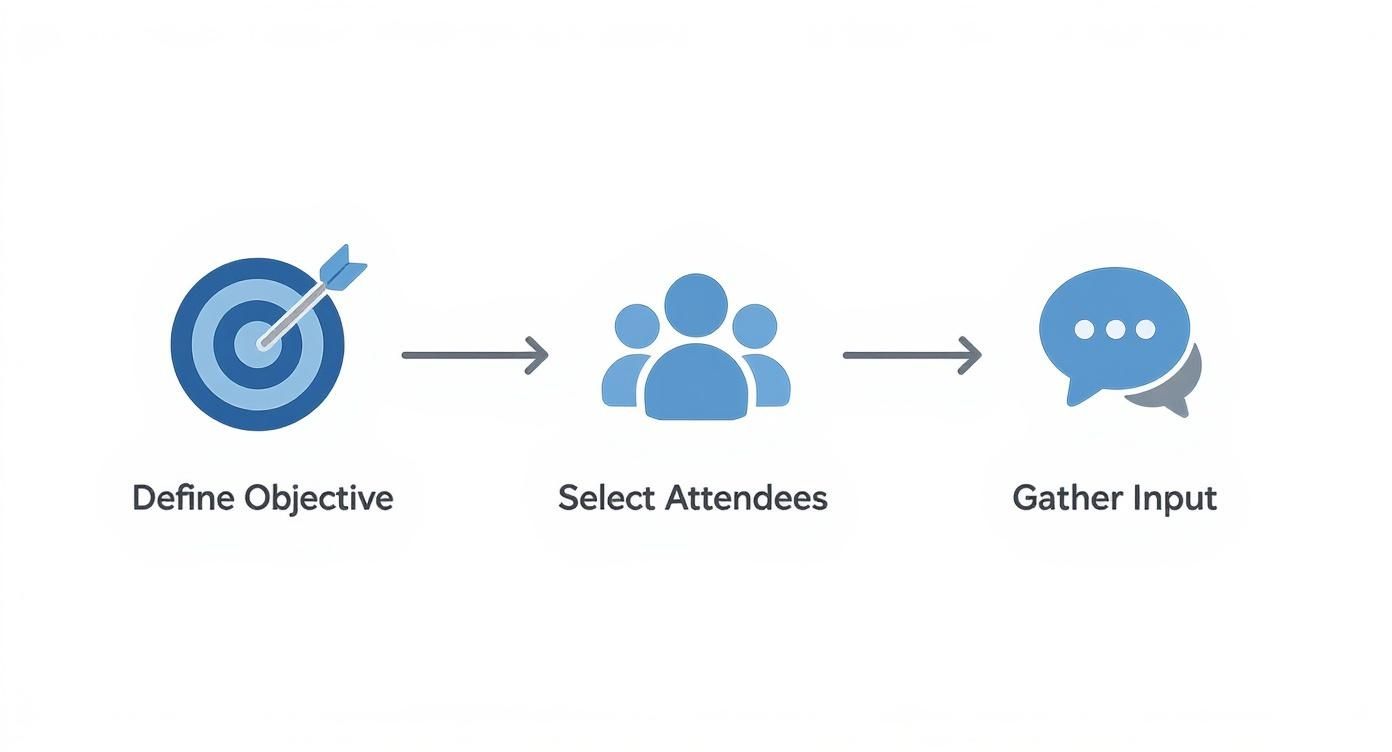
This just drives home the point that a solid agenda is the result of thoughtful planning, not a last-minute scramble.
# Craft a Title That Signals Purpose
The very first thing anyone sees is the meeting title, and it does more than just name the event. A powerful title immediately tells everyone the why behind the meeting and what you expect to achieve. Generic titles like "Marketing Sync" or "Project Check-in" are huge missed opportunities.
Instead, frame your title around the main goal.
- Vague Title: "Q4 Budget Meeting"
- Purpose-Driven Title: "Decision: Finalizing the Q4 Budget Allocation"
See the difference? That small tweak shifts the entire mindset. The first is just a topic; the second is a clear call to action. It tells attendees they aren't just there to listen—they're there to make a call. This sets a tone of urgency and focus before anyone even joins.
# Frame Agenda Items as Actionable Questions
This might be the most important technique for writing an agenda that actually works. Vague bullet points are an open invitation for rambling discussions. Action-oriented questions, on the other hand, demand specific answers and drive the conversation forward.
Think about the difference in direction between these two approaches:
Weak Agenda Item:
- Website Redesign
Strong Agenda Item:
- What is the final go/no-go decision on the proposed homepage mockup?
The first one could go anywhere. The second is a direct question that requires a concrete decision, forcing clarity and helping everyone understand their role. If you want to see how this plays out for different kinds of meetings, checking out a sample agenda format can provide some great inspiration (opens new window).
# Assign Realistic Time Blocks to Each Item
Time-boxing is your secret weapon for keeping meetings on schedule. When you assign a specific amount of time to each agenda item, you create a sense of pace and subtly encourage people to be concise. It shows respect for everyone's calendar and prevents one topic from hijacking the entire meeting.
Just be realistic. If you need to make a major decision, giving it five minutes is just setting yourself up to fail. A good rule of thumb is to slightly overestimate the time needed for complex topics and build in a small buffer at the end.
Practical Tip: End meetings 5 or 10 minutes before the hour or half-hour (e.g., schedule a 25-minute meeting instead of 30). This gives attendees a buffer to prepare for their next call, and they will thank you for it.
# Clearly Define Pre-Work and Required Materials
Never assume people will just know what to prepare. If you want a productive discussion, a dedicated "Pre-Work" section in your agenda is non-negotiable. This ensures everyone arrives with the same foundational knowledge, ready to share insights instead of asking clarifying questions.
Be explicit about what you need from them.
- Instead of: "Review the report."
- Try this: "Please review pages 3-5 of the attached Q3 performance report and come prepared to discuss the two lowest-performing channels."
Linking directly to documents in Google Drive, SharePoint, or whatever tool you use removes all friction. When people show up ready to contribute, you can skip the background summary and dive right into the real conversation. This one step can easily save the first 10-15 minutes of any meeting.
# Agenda Examples for Real-World Business Scenarios
Knowing the theory of a good agenda is one thing. Knowing how to adapt it on the fly is another. A one-size-fits-all template is a recipe for wasted time because the agenda for a fast-paced weekly sync should look nothing like the one for a high-stakes client kickoff.
Let's get practical. Here are four annotated agenda examples I’ve seen work wonders in common business situations. Feel free to steal them, but pay attention to the notes—that’s where the real strategy is.
# The Weekly Team Sync Agenda
This meeting is all about momentum. The entire point is to get quick updates, flag blockers, and keep everyone aligned without getting stuck in the weeds. A good sync agenda is lean, fast, and relentlessly focused on action.
Meeting Goal: Quickly align on weekly priorities and smash any roadblocks. Attendees: The core team (e.g., Project Manager, Lead Dev, Lead Designer)
- Round-Robin Wins (5 mins): Each person shares one key win from last week. This isn’t fluff; it kicks things off with positive energy and celebrates actual progress.
- Review Key Metrics (5 mins): A quick flash of the project dashboard. This keeps the team tethered to data, not just anecdotes about what feels productive.
- Blockers & Challenges (15 mins): The most important part. Go around the room and ask, "What's stopping you from moving forward this week?" This isn't a status update; it's a dedicated problem-solving session.
- Confirm Next Steps & Owners (5 mins): Quickly summarize the solutions and assign a clear owner to each blocker. This turns discussion into action and guarantees accountability.
This whole meeting should be over in 30 minutes, max. It respects everyone’s time and keeps the focus entirely on what’s next.
# The High-Stakes Project Kickoff Agenda
Unlike a quick sync, a project kickoff is all about building a rock-solid foundation. The goal here is total alignment across every key stakeholder on the vision, scope, roles, and how you’ll all talk to each other. This agenda needs to be far more detailed to kill ambiguity before it starts.
Meeting Goal: Align all stakeholders on project scope, timeline, and individual roles. Attendees: Project Sponsor, Team Leads, Client Reps, Key Contributors
- Welcome & Introductions (5 mins): Simple and fast. Everyone states their name and role.
- Present Project Vision & Goals (15 mins): The project sponsor gets to articulate the "why" behind the work and paint a clear picture of what success looks like.
- Review Scope & Key Deliverables (20 mins): Walk through the statement of work. Be explicit about what's in scope and—just as critically—what is out of scope.
- Clarify Roles & Responsibilities (15 mins): Use a RACI chart (Responsible, Accountable, Consulted, Informed) to eliminate any confusion about who does what.
- Agree on Communication Plan (10 mins): Nail down the cadence for updates and the primary channels you'll use, whether it's Slack (opens new window), email, or something else.
- Open Q&A and Next Steps (15 mins): Field any lingering questions and outline the immediate next steps for the first week.
A project kickoff agenda is an investment. The clarity you lock in here will save you from countless hours of confusion and rework later on.
# The Creative Brainstorming Session Agenda
The entire purpose of a brainstorm is to generate a high volume of raw ideas, not to critique them on the spot. Your agenda needs to create a safe, structured space that encourages wild thinking and prevents the two loudest people in the room from dominating.
Meeting Goal: Generate at least 20 new ideas for the Q3 marketing campaign. Attendees: Creative Team, Marketing Strategists
- Warm-up & Icebreaker (5 mins): A quick creative exercise to get people out of their analytical brains.
- Set the Stage & Rules of Engagement (5 mins): Clearly frame the problem you're solving. Then state the ground rules: there are no bad ideas, build on others' thoughts, and all judgment is deferred.
- Silent Idea Generation (10 mins): My favorite part. Everyone writes down as many ideas as possible on their own. This gives introverts a real chance to contribute their best thoughts without being steamrolled.
- Round-Robin Idea Sharing (15 mins): Go around the room. Each person shares one idea at a time while the facilitator captures them on a shared whiteboard. No discussion allowed yet.
- Group & Theme Ideas (10 mins): Now you can talk. As a group, start clustering the raw ideas into common themes or buckets.
- Dot Voting & Prioritization (5 mins): Give everyone three "votes" (sticky dots work great) to place on the ideas or themes they find most promising.
- Define Next Steps (5 mins): End by clarifying which top ideas will move forward for more exploration and who owns that process.
# The Client Check-In Call Agenda
This agenda is built on two things: trust and transparency. Your goal is to prove progress, reinforce your value, and proactively surface any concerns before they become problems. This has to be a two-way conversation, not a monologue.
Meeting Goal: Share project progress, gather valuable client feedback, and confirm next steps together. Attendees: Account Manager, Project Lead, Client Stakeholder
- Recap Last Meeting's Action Items (5 mins): Start by proving you did what you said you would do. It immediately builds confidence.
- Progress Update & Demo (15 mins): Don't just tell them; show them. Demo the latest work and connect it directly back to their business goals.
- Review Key Metrics & Performance (10 mins): Share hard data that proves the value of your work and the ROI they're getting.
- Client Feedback & Questions (15 mins): This is their time. Create dedicated space for them to talk. Ask open-ended questions like, "How is this aligning with your expectations so far?"
- Preview Upcoming Work & Confirm Priorities (10 mins): Walk them through what’s next. This ensures there are no surprises and that you're both aligned on priorities.
- Summarize & Confirm Next Steps (5 mins): End the call by clearly summarizing decisions and action items for both teams.
# Meeting Type vs Agenda Focus
The meeting's primary goal should dictate every single item on your agenda. A status update is about efficiency, while a decision-making meeting is about structured debate. Mismatching the agenda style to the meeting type is a classic mistake that leads to frustration.
This table breaks down how the focus should shift based on what you're trying to accomplish.
| Meeting Type | Primary Goal | Key Agenda Elements |
|---|---|---|
| Status Update | Quick alignment and obstacle identification | Round-robin updates, blocker list, key metrics review, action items. |
| Decision-Making | Make a specific, high-quality choice | Background context, options presentation (pros/cons), structured debate, final vote/decision. |
| Brainstorming | Generate a high volume of new, unfiltered ideas | Problem framing, silent idea generation, round-robin sharing, grouping, dot voting. |
| Problem-Solving | Analyze a specific issue and find a viable solution | Problem definition, root cause analysis, solution brainstorming, action plan development. |
| Project Kickoff | Align everyone on vision, scope, and roles | Project goals, scope review (in/out), RACI chart, communication plan, Q&A. |
Think of the agenda as the rulebook for the conversation. By setting the right rules up front, you guide the team toward the outcome you actually need.
# Adapting Your Agendas for Remote and Hybrid Teams
Running meetings with remote or hybrid teams is a completely different ballgame. When you can’t rely on everyone being in the same room, a clear agenda stops being a "nice-to-have" and becomes your single most important tool. It’s what keeps everyone focused, engaged, and on the same page.
Without a solid plan, virtual meetings quickly spiral into a mess of distractions, tech hiccups, and the soul-crushing "Zoom fatigue" we all know too well. A well-crafted agenda is your best defense, making sure every minute of screen time counts. It’s how you write a meeting agenda that respects both the clock and your team's energy.
# Engineer Engagement from the Start
In a remote meeting, you lose all the subtle cues of body language and shared physical space that help maintain focus. Your agenda has to do that work instead. It needs to proactively create opportunities for interaction and make it crystal clear how each person is expected to contribute.
One of the easiest wins here is to embed links directly into the agenda. Don't just list "Review Q3 Launch Plan." Instead, link straight to the specific Miro board, Google Doc, or Figma file you'll be looking at. This small step removes friction and gets everyone into the right collaborative space instantly.
Another powerful move? Explicitly assign roles or speaking parts right on the agenda.
- For a project update: "Item 2: Demo of the New User Dashboard (10 mins) - Led by Maria"
- For a feedback session: "Item 3: Gather Feedback on Proposal Draft (15 mins) - Facilitated by David, with input from the design team"
Just by putting names next to items, you let remote participants know exactly when they're up. This prevents those awkward silences and makes sure every voice is actually heard.
# Prioritize Clarity and Combat Virtual Fatigue
Let’s be honest: digital meetings are way more draining than in-person ones. A smart remote agenda acknowledges this reality and builds in safeguards to keep energy levels up and communication crisp.
Miscommunication is far more likely when you can't read non-verbal cues, so ensuring everyone can be understood is vital. It's often helpful to share resources on how to speak English more clearly on video calls and presentations (opens new window) to make things smoother for the whole team.
Practical Tip: Start remote meetings with a quick tech check ("Can everyone hear me and see the screen?") and a one-word check-in on how everyone is feeling (e.g., "energized," "focused," "busy"). This humanizes the call and flags potential issues early.
Also, for any meeting running longer than 60 minutes, building in short breaks is non-negotiable. A scheduled five-minute "bio-break" or "camera-off" moment lets people stretch, grab water, and reset. This small act of empathy can make a huge difference in the quality of the discussion in the second half of the meeting.
# Build a More Inclusive Hybrid Meeting Culture
Hybrid meetings—with some folks in the office and others dialing in—are by far the toughest to get right. The risk of "proximity bias," where the people physically in the room dominate the conversation, is incredibly high. Your agenda is the key to leveling the playing field.
Start by adopting a "remote-first" mindset, even if you’re in the office. This means everyone joins the call from their own laptop, with their own camera and mic. This simple rule prevents side chats and makes the virtual experience the primary one for everyone involved.
Then, use the agenda to deliberately create space for your remote attendees.
- Explicitly call on remote team members first for their input on key topics.
- Use digital tools for everything. All brainstorming, polling, and notes should happen in a shared digital space, not on a physical whiteboard that remote folks can't see.
- Schedule a "virtual water cooler" for the first or last five minutes. This creates a pocket for the informal chat that would normally happen in an office.
These intentional moves are critical. As companies weigh their options, understanding the nuances of whether a hybrid or fully remote work model is better (opens new window) can provide helpful context. Ultimately, a great hybrid agenda makes location irrelevant and contribution everything.
# Common Questions About Writing Meeting Agendas
Knowing the "how-to" of writing an agenda is a great start, but the real world always throws a few curveballs. Getting the fundamentals down is one thing; feeling confident when those practical, "what if" questions pop up is another.
This is where we tackle the most common questions that come up. Think of this as the final polish on your agenda-writing skills, giving you clear, direct answers so you’re ready for anything.
# How Far in Advance Should I Send the Agenda?
The sweet spot is 24-48 hours before the meeting. It’s the perfect timing. Sending it then shows you respect everyone's schedule, giving them enough runway to read it, do their prep, and come with actual thoughts. Any earlier and it gets lost in the inbox flood; any later and it's basically useless.
For bigger, meatier meetings—think strategy sessions or quarterly planning—give people more time. Aim for 3-5 days in advance. That gives the deep thinking required for those conversations a chance to actually happen.
Practical Tip: Set a recurring personal reminder for the day before your important meetings that says, "Send agenda for [Meeting Name]." This simple system ensures you never forget.
# What Is the Biggest Mistake to Avoid?
Vagueness. It’s the absolute killer of productive meetings.
An agenda item that just says "Marketing Update" or "Discuss Project X" is an invitation for a rambling, pointless conversation. No one knows what the goal is, so the discussion just drifts.
The fix is simple: frame every item as a question to answer or a decision to make.
- Vague: "Spring Campaign"
- Actionable: "Decide on the Final Slogan for the Spring Campaign?"
This tiny change flips a switch, turning a passive topic into a clear objective. When you’re specific, you get specific results.
# Who Is Responsible for Creating the Agenda?
The meeting organizer is ultimately on the hook. If you called the meeting, you own the plan for making it a good one. Simple as that.
But the best agendas aren't created in a vacuum. A smart organizer crowdsources a little. Before you finalize anything, shoot a quick message to the key attendees. Ask them, "What do you need to get out of this meeting for it to be a win for you?"
Practical Tip: For recurring team meetings, rotate the responsibility of creating the agenda. This gives everyone ownership of the meeting's success and brings fresh perspectives to the structure.
# Does a Quick 15-Minute Chat Really Need an Agenda?
Yes, absolutely. But it doesn't need to be a formal, multi-page document.
For a quick sync or check-in, the "agenda" can be a single, focused sentence in the calendar invite. That's it.
For instance, the invite's title or description could just say: Goal: Get final approval on the client proposal design.
That one line does all the work. It keeps the 15-minute chat from secretly turning into a 45-minute unstructured ramble. It respects everyone's time and makes sure you walk away with the one thing you needed.
Running meetings like a pro means focusing on the conversation, not fumbling for controls. With MuteDeck, you can manage your mic, camera, sharing, and more with a single, reliable interface that works across Zoom, Teams, and Google Meet. Stop the button-hunting and make every meeting smoother at https://mutedeck.com (opens new window).