MuteDeck v4.9: Which mic is used, smaller updates, and fixes
This release introduces a much lighter way to deliver updates, adds a "microphone in use" indicator so you can see when another app grabs your mic - and know which mic is being used, and fixes a crash that could cause MuteDeck to quit unexpectedly when using the API heavily.
Smaller, Quieter Updates
MuteDeck can now update itself without the full installer. Starting from this version, routine updates download a fraction of what they used to (around 15 MB instead of 100–200 MB), install in the background, and restart straight to the tray — no installer window, no clicking through a wizard. Updates that involve bigger changes still use the full installer automatically, so you always get a safe install either way. The next version will use this new method.
TL;DR: From here on, most updates just happen, quietly and quickly.
See When the Microphone Is in Use
The main window now briefly shows when another app is using your microphone, along with which device it's using. The line appears the moment something starts capturing the mic and tucks itself away again after a few seconds, so it never gets in the way. It's on by default and works on both macOS and Windows. You can turn it off under Settings → General ("Briefly show when the microphone is being used").
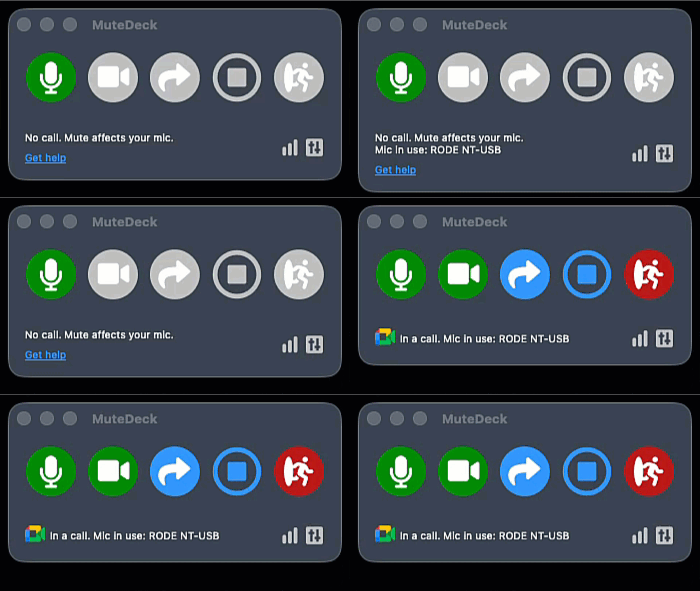 Above first used voice-to-text, then opened a Google Meet - both show the mic in use
It's the perfect way to know if you're using the right microphone when you're joining a meeting. It also works outside of meetings, it'll show you any time an app grabs your mic, like when you start recording a video or using voice to text.
Stability and Reliability
- Unexpected restarts: Fixed a crash that could make MuteDeck quit and need a manual restart. It could happen when the API is used heavily; several times a second at the exact moment your meeting state changed.
- Update checks: Background update checks that fail — for example right after starting up or waking from sleep, before the network is ready — now retry on their own instead of silently giving up until the next scheduled check.
