# MuteDeck v4.11: Faster Controls, Fewer Interruptions

MuteDeck v4.11 is out, and it's a heck of a lot faster. 😊 I've reworked Teams and Zoom support on macOS and Windows, so your controls respond more quickly and MuteDeck does less work in the background.
There's another change you'll probably appreciate just as much: pressing mute no longer needs to bring the meeting window over your notes.
# A Lot Less Waiting
Press mute, glance at MuteDeck, and see that you're muted. That should be quick. With this release, I've cut a lot of the waiting between pressing a button and seeing the change.
Here are the estimated improvements:
- Teams mute and camera status: the wait after a button press goes from 2–4 seconds to 0.15–0.25 seconds. That's about 93% less waiting to see the new status.
- Meeting status with Teams and Zoom open: updates go from 2–3 seconds to 1.1–1.5 seconds, an estimated 45–50% less waiting.
The practical change is that you spend less time wondering whether your button press worked.
A busy Teams no longer holds things up for Zoom when you have both open, and MuteDeck's own window stays responsive while a meeting app takes its time. You don't need to change any settings to get these improvements. They're part of the update on both macOS and Windows.
# Your Notes Can Stay in Front
If you've ever pressed mute while reading a document and had Teams jump over it, you'll know why this matters.
You can now mute or toggle your camera in Teams and Zoom without bringing the meeting window forward or moving your mouse. Keep reading your notes, editing your document, or presenting your window. Your Stream Deck, hotkey, or MuteDeck button can take care of mute and camera in the background.
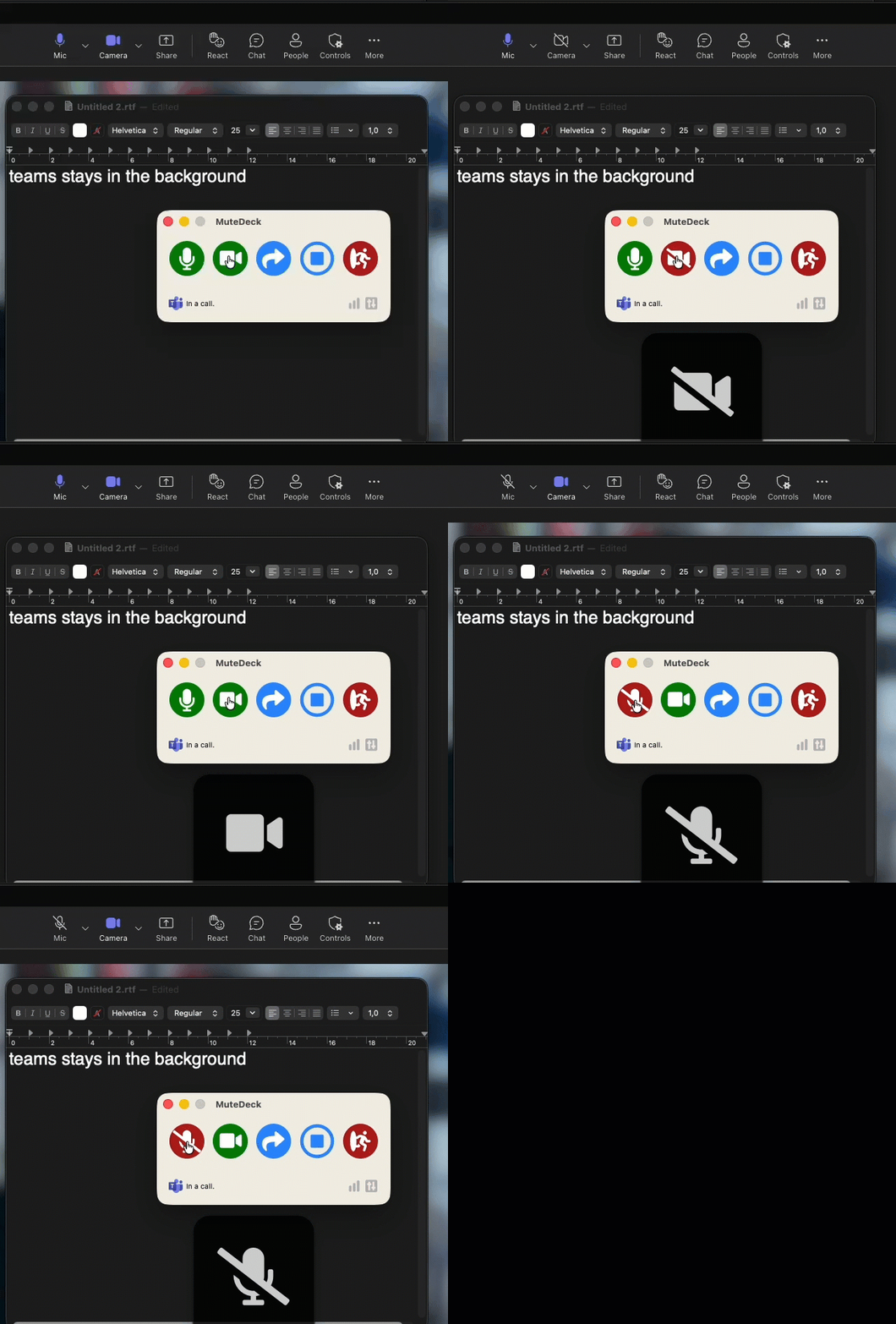
This works on macOS and Windows. It also fixes a frustrating Teams problem on macOS where clicking mute or camera in MuteDeck could do nothing if your mouse was still moving afterwards.
Starting a screen share still opens the window where you choose what to share. Actions that open menus, such as reactions, or use keyboard shortcuts may still bring the meeting app forward. The everyday mute and camera controls can leave you to it.
# Sharing and Recording Behave Better
Teams and Zoom like to move their controls around while you're sharing. MuteDeck now does a better job of following along.
- Teams on macOS: mute and camera work from the little floating meeting window. If you need chat, participants, reactions, or recording, MuteDeck opens the full meeting window and leaves it in front so you can use it. Recording controls work in the different places Teams puts them, and transcription alone no longer shows up as a recording. I've also fixed problems with sharing in German Teams.
- Teams on Windows: choosing what to share no longer makes MuteDeck think you've left the call.
- Zoom on Windows: MuteDeck keeps up when Zoom switches between its floating sharing toolbar and the full meeting window. Stopping a share no longer briefly looks like leaving the call. Recording status, starting a recording, and stopping it work through Zoom's newer More menus, including while sharing.
When Teams or Zoom is slow to respond, MuteDeck now checks whether the first press worked before trying anything else. That helps avoid a second toggle undoing the first one.
# Easier to Connect at Work
If your office uses a proxy to connect to the internet, you can now set that up under Settings → Proxy. Use your computer's existing settings or enter the details from your IT team, then click Test connection to check them.
Proxy settings are available from the license window too, so you don't need to activate MuteDeck before sorting out the connection. License activation, settings sync, and smaller background updates use these settings.
Updates that need the full installer still use a separate updater, which can't use proxy details entered in MuteDeck.
# Tell Me What's Missing or Broken
There's a new Settings → Feedback section for feature requests and bug reports. You can also open it through Send Feedback… in the tray or menu bar menu.
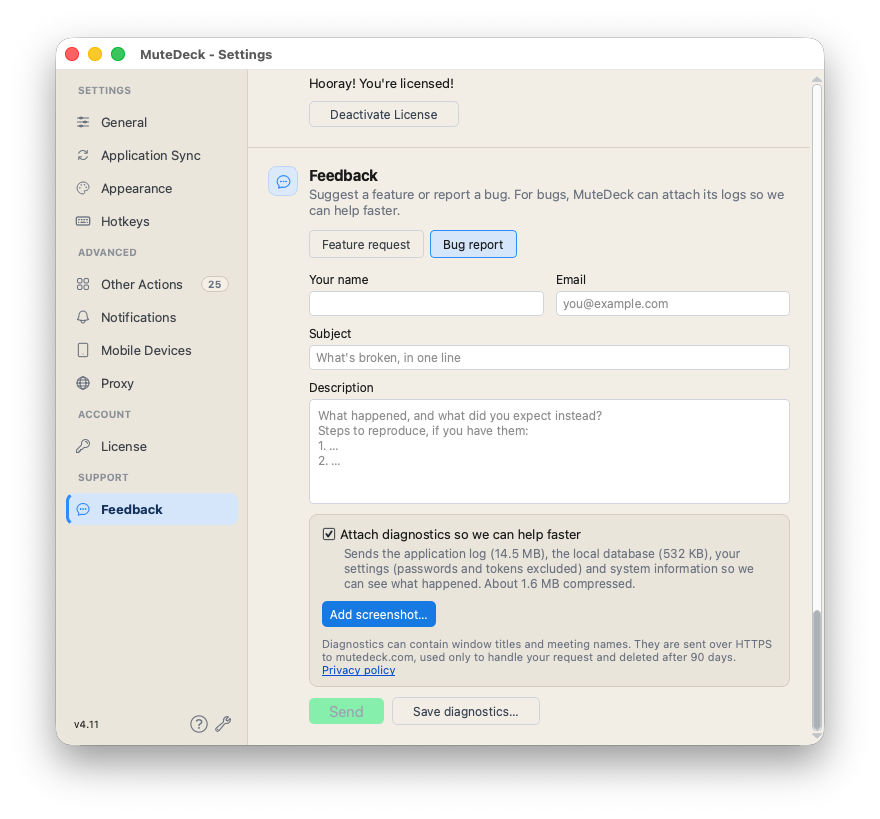
For bug reports, MuteDeck can collect the logs and app details that help me work out what went wrong. They're attached by default, and you can turn that off before sending. Add screenshots if they help, or save the logs to a file if you'd rather email them. No more digging around for the right folder.
# A Few More Fixes
- Slack huddles: updated for Slack's changes on macOS and Windows. MuteDeck now finds and controls huddles inside the main Slack window, so you don't have to pop them out anymore.
- Zoom shortcuts on Windows: custom actions and reactions no longer fail just because you're still holding down the hotkey that triggered them.
- Memory and stability: a few memory leaks are fixed, along with a problem where a stuck meeting app could keep MuteDeck from quitting.
- Windows appearance: fixed a few cases where the main window and action notifications could have an odd border.
Check for updates in MuteDeck to get v4.11, or download MuteDeck (opens new window).
As always, if you run into issues, let me know through the new feedback form or at [email protected].
KEEP EXPLORING
More product updates